Most documents carry pages nobody needs. A fax cover sheet, the blank back of a double-sided scan, three pages of boilerplate terms, the duplicate the feeder pulled through twice. Removing them makes a file shorter, lighter and easier to read — and unlike almost every other way of reducing a PDF, it costs nothing in quality.
This covers how removal works in Pixpoo, the arithmetic that makes it the best first move on an oversized file, and one thing it is emphatically not.
Delete pages nowTick what you do not need and download the rest. Free, nothing uploaded.Open Delete Pages →
Nothing is deleted, exactly
Worth understanding, because it explains the quality question. The tool does not open your document and cut pieces out of it. It builds a new PDF and copies across only the pages you kept.
Those copies are exact. Text arrives selectable, images arrive at their original quality, vector graphics stay sharp, and nothing is re-compressed on the way. The pages you keep are indistinguishable from the pages you started with — and your original file on disk is untouched, because the result is a separate download.
The arithmetic worth knowing
File weight is spread roughly evenly across pages, especially in scanned documents where every page is an image of similar size. That gives you a rule that is unusually reliable:
| Pages removed | Roughly what happens to the size | Quality cost |
|---|---|---|
| 1 in 5 | Down about a fifth | None |
| Half | Down about half | None |
| All but the three you need | Down enormously | None |
Compare that to compression, which reduces size by rebuilding every page as a lower-resolution image and throwing away the text layer in the process. When a document is too big for an email, the honest first question is not “how hard should I compress?” but “does the recipient need all forty pages?” Very often they need six, and six perfect pages beat forty degraded ones.
If the file is still too heavy after trimming, then reach for Compress PDF — and you will need a gentler setting than you would have, because you have already done half the work for free.
Working through the grid
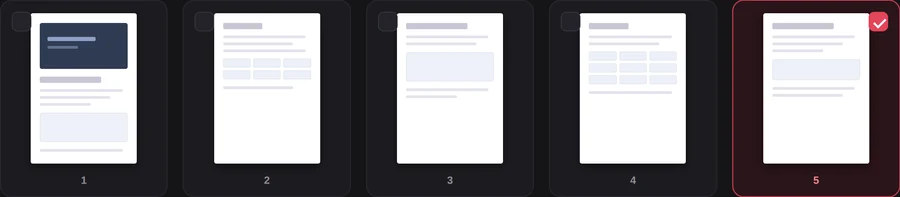
Pages appear as thumbnails, twelve at a time, with pagination for longer files. Tick the ones to remove. The selection is what goes, which is the opposite convention from tools that ask you what to keep — worth a moment's attention if you have just come from one of those.

A running count shows how many pages remain, which is the number to sanity-check before downloading. If a form demanded a ten-page submission and the counter reads nine, you have found the problem before the reviewer did.

What this is not
It is not redaction, and the distinction matters enough to be blunt about.
Removing a page removes that page and everything on it — that part is genuine. What it cannot do is hide something on a page you keep. Drawing a black box over a paragraph in some other tool and then deleting neighbouring pages does not make the paragraph safe; text sitting under a rectangle is still text in the file, and anyone can select it.
If a document contains information that must not reach the reader, remove the whole page, or go back to the source document and produce a version that never contained it. Never rely on covering something up.
The one thing you cannot do
You cannot delete every page. A PDF with no pages is not a document, so the tool stops you rather than handing back something no reader will open. If you find yourself selecting everything, what you actually want is a different file.
Trim your own documentWatch the counter, then download the shorter file.Open Delete Pages →
Getting a better result
Trim before you do anything else
Every later operation is cheaper on a shorter document. Converting, recognising text, compressing, even just opening the file — all of them are proportional to the page count, and all of them are work you do not want to spend on pages that are about to be thrown away.
Keep the original
The download is a new file, so your source is safe on disk. Keep it until you are certain, because putting a deleted page back means starting over.
Look for the usual suspects
Scanned bundles collect a predictable kind of rubbish: blank versos from double-sided originals, separator sheets, the same page pulled through twice, and a cover page that made sense to the sender and not to you. A quick pass through the thumbnails usually finds several.
Consider whether you want the opposite tool
When you are keeping most of the document, deleting is the right frame. When you are keeping three pages out of ninety, Extract Pages asks the question the other way round and is far less clicking.
Check the count against a requirement
Portals and courts often specify a page count or a page order. The remaining-pages number is right there; read it before you download rather than after you submit.
What it will not do
- It does not redact — content on kept pages remains fully present.
- It does not reorder — kept pages stay in their original sequence.
- It cannot leave you with an empty document.
- It cannot open a protected file — run Unlock PDF first.
Common questions
Does deleting pages reduce the quality of the rest?
No. Kept pages are copied without re-encoding, so they are identical to the originals in every respect.
How much smaller will the file be?
Close to proportional in a scanned document, where pages weigh roughly the same. In a mixed document it depends on what you removed — dropping ten pages of plain text from a file dominated by one enormous photograph will barely register.
Can I get a page back?
Not from the new file, but your original is untouched on your disk — the tool downloads a separate document rather than modifying what you uploaded. Start again from the original.
Is my file uploaded?
No. The document is read from your own disk and rebuilt in your browser’s memory. Nothing is transmitted, which matters when the pages you are removing are the confidential ones.
Can I delete pages from a scanned document?
Yes — scans behave exactly like any other PDF here, and this is where trimming pays off most, because scanned pages are large.
What if I need to keep the pages separately?
Then you want Split PDF, which produces several documents rather than one shorter one.
The rest of the PDF toolkit
- Extract PagesThe same job phrased as what to keep.
- Compress PDFThe next step, if trimming was not enough on its own.
- Organize PDFDelete and reorder in the same pass.
- Split PDFWhen the parts should become separate documents.
- Rotate PDFStraighten the pages that survived the cut.