Page numbers are invisible until they are missing. Then somebody says “look at the third page — no, the third one after the appendix”, and a meeting loses two minutes to counting.
Adding them to a PDF takes about thirty seconds. The controls are more thoughtful than the job strictly requires, and two of them handle situations that catch people out.
Add page numbers nowNine positions, five formats, live preview. Free, nothing uploaded.Open Add Page Numbers →
Nothing is redrawn
Numbers are written onto each page as real text in a standard PDF font. The page content underneath is not re-rendered or re-compressed, so your document keeps everything it had — selectable text, sharp vectors, images at full quality — and the file grows by a negligible amount.
The numbers themselves are text too, which means they are selectable and searchable like anything else on the page rather than being pictures of digits.
Five ways to write a number

| Format | Looks like | Suits |
|---|---|---|
| Plain | 7 | Almost everything |
| Page X of Y | Page 7 of 24 | Anything printed or posted — a reader can tell if a page is missing |
| Dashes | - 7 - | Reports and formal documents, a typographic convention |
| Roman | vii | Front matter — contents, preface, executive summary |
| Letters | g | Appendices and exhibits, numbered separately from the body |
Page X of Y earns its keep on anything that leaves your hands as paper. A recipient holding page 7 of 24 knows immediately whether the bundle is complete, which is exactly the question that arises when a court filing or a signed contract arrives short.
Where to put them
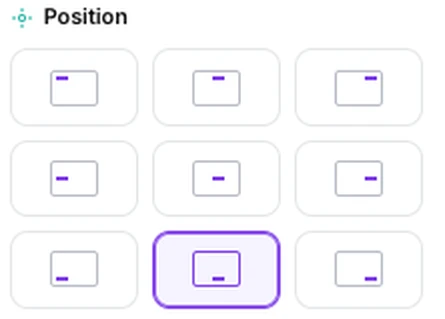
A nine-point grid, with margins you can set independently for the horizontal and vertical edges. Bottom centre is the conventional default and the safe choice.
Bottom outer corners are the convention for anything bound or printed double-sided, because the number stays visible when the pages are held in a stack. Since a PDF has no notion of odd and even sides, you would need two passes over separate halves of the document to do that properly — usually more effort than it is worth outside professional typesetting.
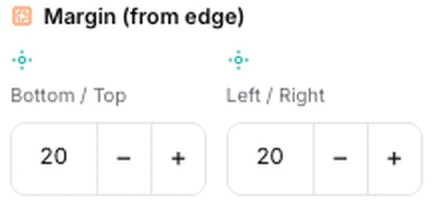
The margin settings matter more than they look. Home and office printers cannot print to the very edge of a sheet, and a number placed too close to it will be clipped. Keep it away from the edge if the document is going on paper, and check the preview against the existing content — a document that already has a footer will happily let you print a number straight on top of it.
The two settings that solve real problems

Skip the first page is for documents with a cover. A title page with a large 1 on it looks wrong, and this leaves it clean while numbering everything after it.
Start from sets what the first numbered page is called. This is what you need when a document is one part of something larger — a chapter beginning at 47, an appendix continuing from the main report, a section that will be bound behind another. Combined with skipping the cover, most real-world numbering situations are covered.
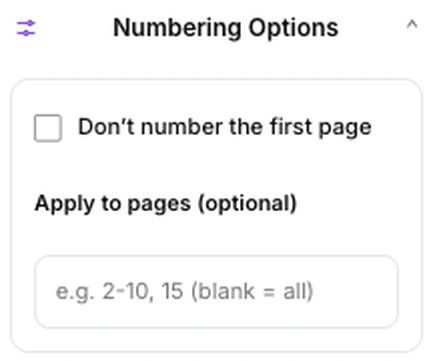
You can also restrict numbering to a page range, which is how you number the body of a document while leaving the front matter and the appendices alone — or, run twice, how you give the front matter roman numerals and the body ordinary digits.
One detail worth knowing if you use Page X of Y with any of these: the Y counts the pages that are actually being numbered, not the pages in the document. Number pages 5 to 20 and the last one reads “Page 16 of 16”, not “of 24”. That is the right behaviour for a numbered section, and worth a second look if you expected the document total.
Making them look right
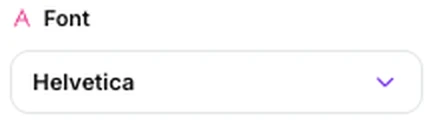
Five typefaces — Helvetica and its bold, Times Roman and its bold, and Courier — with size and colour controls. These are the fonts every PDF reader has built in, which is why they render identically everywhere.
Two pieces of advice. Match the serif or sans-serif character of the document — Times under a Times document, Helvetica under a sans one — and keep the size a little below the body text, around nine to eleven points. A page number is navigation, not content, and should not compete with the words above it.

Dark grey often reads better than black for the same reason: present when you look for it, quiet when you are not.
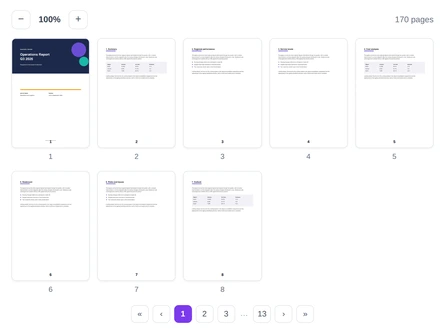
The preview shows the number on your actual page, so there is no need to guess at any of this — adjust until it looks right.
Number your own documentCheck it against the preview, then download.Open Add Page Numbers →
Getting a better result
Number last
Do this after merging, deleting and rearranging. Numbers added first become wrong the moment a page moves, and there is nothing to warn you — they are drawn text, not a field that updates.
Check for an existing footer
Many documents already carry something at the foot of the page. The preview will show you the collision; move the number to the other side or change the vertical margin.
Skip the cover
It takes one click and it is what a designed document does. A numbered title page reads as an oversight.
Keep clear of the paper edge
Anything within about a centimetre risks being clipped by a desktop printer. Give it room if the document is going to paper.
Two passes for two schemes
Front matter in roman, body in digits: run the tool twice with different ranges and formats. It takes a minute and looks properly typeset.
What it will not do
- It does not update automatically — numbers are fixed text, so rearranging afterwards makes them wrong.
- It does not alternate positions for double-sided printing in one pass.
- It does not add headers or other footer text — numbers only.
- It does not avoid existing content — check the preview for collisions.
- It cannot number an encrypted document — unlock it first.
Common questions
Will adding numbers change my document?
Only by adding the numbers. Pages are not re-rendered, so text stays selectable, images keep their quality, and the file barely grows.
Can I start numbering at something other than 1?
Yes — set a starting value. Combined with skipping the cover and restricting to a range, that covers chapters, appendices and continuations.
Why does “Page X of Y” show the wrong total?
Because the total counts numbered pages rather than every page in the file. If you skipped the cover or numbered a range, the total reflects that smaller set.
Can I remove page numbers from a PDF?
Not from a file that already had them — they are part of the page content. Keep your unnumbered original, which is untouched, since the tool downloads a new document.
Is my document uploaded?
No. The numbers are written in your browser on your own machine, and nothing is transmitted.
Can I number only some pages?
Yes, with the range field — useful for numbering a body while leaving front matter and appendices alone.
The rest of the PDF toolkit
- Organize PDFSettle the page order before you number anything.
- Merge PDFCombine first, so one sequence runs through the bundle.
- Watermark PDFThe other thing you stamp across every page.
- Create PDFAssemble a bundle, then number the result properly here.
- Protect PDFLock the finished, numbered document.